
What Is Pinterest SEO? A Beginner’s Guide (Update 2026)
Pinterest SEO is the practice of optimizing your profile, boards, and pins so Pinterest surfaces your content to the people searching for it. It borrows the same core idea as Google SEO: use the words your audience searches for, in the places the algorithm reads them.
The difference is the platform. Pinterest works less like a social feed and more like a visual search engine. Millions of people open the app the way they’d open Google, type a query, and expect relevant results, not just posts from accounts they follow.
If you searched “what is Pinterest SEO” hoping for a plain answer, here it is up front: it’s keyword-driven optimization, applied to a platform built around saving and discovering ideas. This blog covers what is Pinterest SEO, why it’s worth a try for your marketing efforts, and how to set it up for your business.
What Is Pinterest SEO?
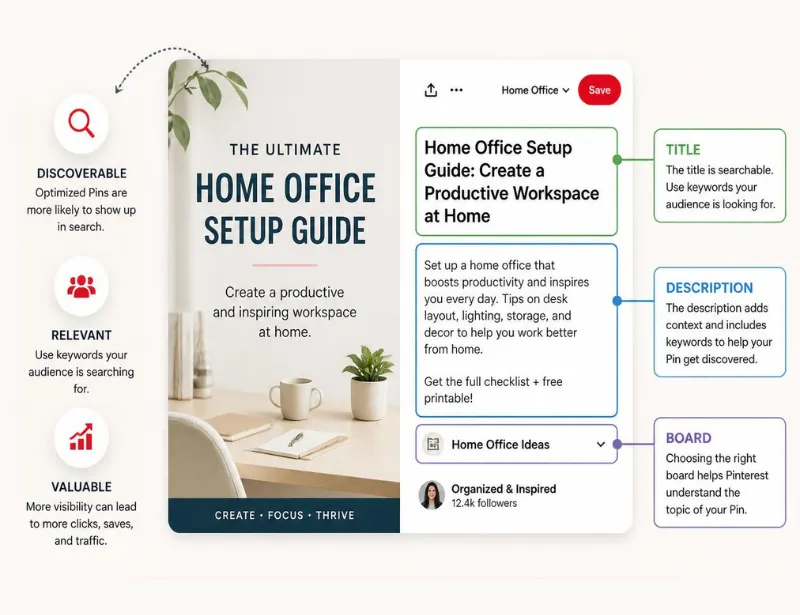
Pinterest SEO is the process of optimizing your profile, boards, pins, and linked website pages so Pinterest’s search and recommendation system shows your content to more of the right people. It matches keywords in your titles and descriptions to what searchers type in, the same way Google does, but applies that matching to pins and boards instead of web pages.
In practice, Pinterest SEO basics come down to three things: 1. using the keywords your audience actually searches for, 2. publishing pins people want to save, and 3. giving Pinterest a website that backs up what your pins promise. Get those three right and the algorithm does most of the distribution work.
How Pinterest SEO Differs From Google SEO
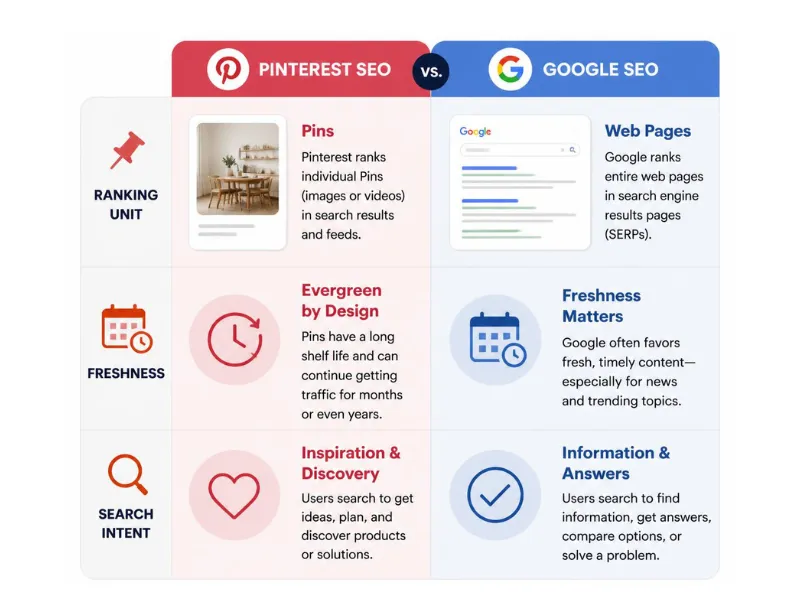
Google ranks web pages. Pinterest ranks pins, boards, and profiles, three separate pieces of content that can each show up in search on their own. A single blog post can generate several pins, each targeting a different keyword and audience, something one URL can’t do on Google.
Pinterest also rewards fresh content more aggressively. A brand-new pin linking to a two-year-old blog post can still get distributed as if it were new, because Pinterest evaluates the pin’s age, not just the age of the page it links to. Accounts that post consistently tend to outperform accounts that publish once and stop.
Search intent looks different too. People use Google to solve an immediate problem and Pinterest to plan for something later: a wedding, a renovation, a recipe for next weekend, or your next travel destination. That longer planning window is part of why Pinterest traffic tends to compound over months rather than spike and fade.
Why Pinterest SEO Matters
Pinterest reported 631 million monthly active users in the first quarter of 2026, its tenth straight quarter of double-digit user growth. That’s a search audience most sites aren’t competing for, since Pinterest results rarely overlap with Google’s.
The platform also skews toward high-intent, plan-ahead behavior. Users search for gift ideas, recipes, and home projects weeks or months before acting on them, which gives a well-optimized pin a longer shelf life than a single day of social reach.
For a blog or small business without a big ad budget, that combination – a large search audience Google doesn’t touch plus evergreen distribution – makes Pinterest search optimization one of the higher-leverage places to spend an hour a day.
How Pinterest SEO Works (Ranking Factors)
Pinterest has said publicly that its algorithm weighs a mix of signals, but three carry the most weight in practice.
Saves
A save, Pinterest’s version of a bookmark, is the strongest signal you can get. Every time someone saves your pin to their own board, Pinterest reads that as proof the content is worth showing to more people with similar interests.
Keywords
Pinterest reads the words in your pin titles, descriptions, board names, and the text on the linked web page to understand what your content is about. Matching that language to real search terms, rather than clever branding, is what gets your content matched to a query.
Matching interests
Pinterest maintains thousands of official interest categories it uses to route content to the right feeds. The closer your pins align with an established interest, not just a keyword but a topic Pinterest already tracks, the more consistently they get shown.
Freshness, board relevance, and account quality all factor in too, but saves, keywords, and interest matching are the three worth prioritizing first.
Where Pinterest SEO Lives on Your Account
Optimization touches four places, and skipping any one of them leaves the others working harder than they need to.
Your profile
Your profile name, username, and bio are the first things Pinterest reads to understand your niche. A profile like “Kitchen Sara | Easy Recipes & Dinner ideas for Every Day” tells Pinterest, and searchers, exactly what to expect, compared to a name with no context at all.
Your boards
Each board is its own indexable page. Give boards simple, keyword-focused names such as “Easy Recipes” instead of vague ones like “Yum,” and write descriptions using synonyms and related terms (like semantic keywords for SEO) rather than repeating the board name. My guide on Pinterest board ideas to support your SEO walks through naming and structure in more depth.
Your pins
Pin titles and descriptions carry the most weight per piece of content. Lead with your main keyword in the first few words of the title, since Pinterest truncates longer titles in the feed, and use the description to add related terms the title didn’t cover.
Your website
Pinterest crawls the page a pin links to, so that page needs to match what the pin promises. If your pin says “30-Minute Chicken Dinners” but the linked page never uses that phrase, you lose some of the relevance signal Pinterest is trying to match.
How to Get Started With Pinterest SEO
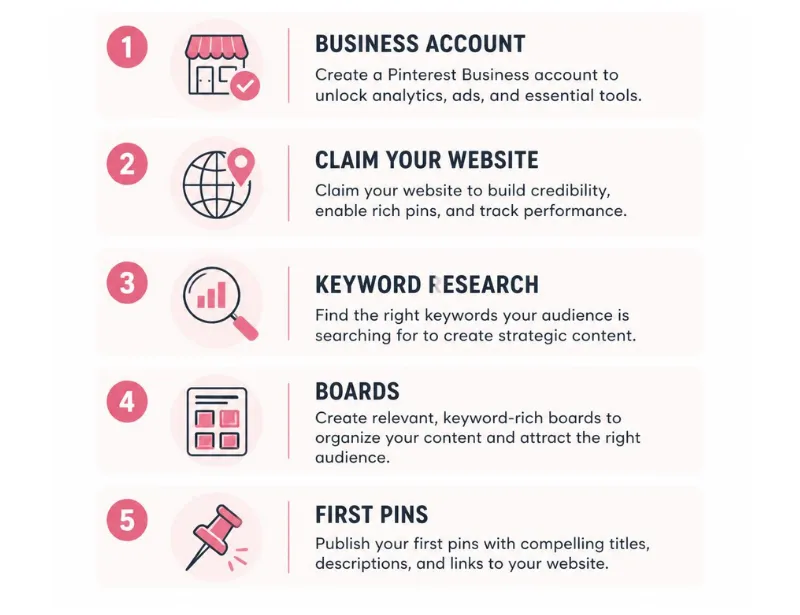
Setting up Pinterest SEO the right way takes about an afternoon, and it’s easier in this order.
- Convert to a Pinterest business account. This unlocks Pinterest Analytics, which you’ll need to see what’s actually working. See our full walkthrough on how to set up a Pinterest business account.
- Claim your website using the DNS TXT record method. It connects every pin from your site back to your account and is more stable than the HTML tag method, since it survives theme and plugin updates.
- Do basic keyword research. Type your main topics into the Pinterest search bar and note the autocomplete suggestions, then check Pinterest Trends for what’s rising in your niche. For a deeper breakdown, see “5 types of Pinterest keywords you need to know.“
- Build 5 to 10 keyword-focused boards. Keep each one narrow enough that every pin fits, but broad enough to keep adding to for years.
- Publish your first pins. Use your main keyword in the title, 2 to 3 related terms in the description, and link each pin to a page that matches what it promises.
If setting all of this up, or fixing an account that’s stalled, sounds like more than you want to take on solo, book a Pinterest SEO strategy call and we’ll map out the plan together.
Common Pinterest SEO Mistakes Beginners Make
Most accounts don’t underperform because of one big error. They lose traction to a handful of small habits that compound over months.
- Repeating the exact keyword in every title and description instead of using natural variations, which reads as spammy to both Pinterest and human searchers.
- Creating one pin per blog post and never returning to add more, missing the chance to target additional keywords and boards from the same content.
- Skipping board descriptions entirely, leaving Pinterest with less context to match the board to a search.
- Linking pins to a homepage or category page instead of the exact article the pin promises, which breaks the relevance match Pinterest is looking for.
Fixing these takes far less effort than the initial setup, and it’s usually the fastest way to get a stalled account moving again.