How to Get Traffic on Pinterest When Nothing’s Working
If you’ve been searching for how to get Pinterest traffic and nothing you’ve tried has moved the needle, you’re not alone, and the platform almost certainly isn’t broken. Pinterest just closed Q1 2026 with 631 million monthly active users, and 96% of the platform’s top searches are unbranded, meaning people are actively looking for ideas like yours instead of typing in a company name they already know. The audience is there. When traffic still won’t grow, the cause is almost always one of five fixable things, not a lost cause. This post walks through how to find which one applies to your account, then exactly how to fix it.
Why Pinterest Traffic Takes Longer Than It Feels Like It Should
Most people judge Pinterest the way they’d judge Instagram or TikTok, where a post either takes off in the first 48 hours or it doesn’t. Pinterest runs on a different clock entirely. It behaves like a search engine: a pin gets indexed, then it can sit quietly for weeks before Pinterest starts surfacing it to people who search for that exact idea.
That’s why new accounts typically need three to six months of consistent pinning before traffic becomes noticeable, and why judging a strategy after two or three weeks almost always leads to the wrong conclusion. If you’re still in month one, the real question isn’t why your Pinterest isn’t getting traffic yet. It’s whether your foundation is set up correctly so the traffic Pinterest eventually sends actually has somewhere solid to land.
Pinterest has also documented, on its own engineering blog, systems like PinnerSage, which build multiple interest profiles per user based on roughly 60 to 90 days of their activity. That detail matters: Pinterest isn’t matching your keywords once and moving on. It keeps re-evaluating who each pin is a good fit for as both your content and each Pinner’s behavior change.
Run This 5-Point Diagnostic Before You Change Anything
Before you redesign every pin or start over on your boards, spend twenty minutes checking these five things in order. Most Pinterest traffic problems trace back to just one or two, not all five at once.
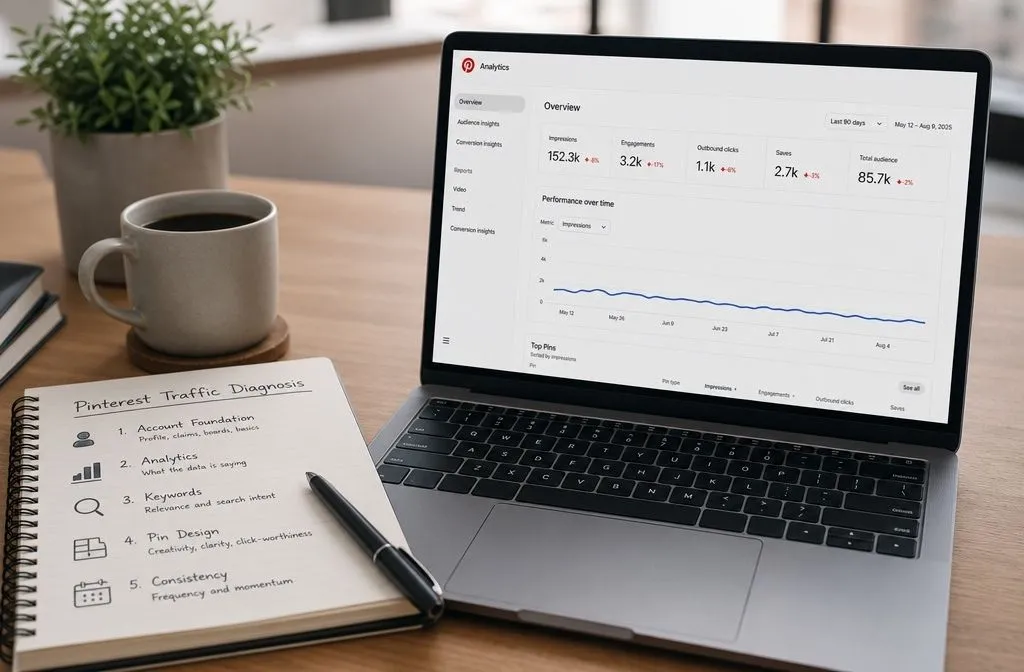
1. Your Account Foundation
Confirm you’re on a Business account, that your website domain is claimed, and that Rich Pins are enabled. A claimed domain connects everything you publish back to your account, and Rich Pins automatically pull your article title, description, and author, which looks more credible to Pinners and gives Pinterest more text to match against searches. If any of these three pieces are missing, fix them first, since nothing else on this list works as well until they’re in place.
2. What Your Analytics Are Saying
Open Pinterest Analytics and compare your last 90 days to the 90 days before that. If impressions are low across the board, the problem is distribution, meaning your keywords or pin designs aren’t matching what people search for. If impressions are healthy but clicks are low, Pinterest is already showing your pins; they’re just not compelling enough to tap. Those are two different fixes, and treating a click problem like a distribution problem wastes weeks.
3. Your Keyword Coverage
Pull up your top-performing pins and boards and note which keywords appear in the titles. Then check those same keywords in Pinterest Trends to see whether they’re still active. A pin can lose traffic simply because the phrase it targets has gone out of season, not because anything about your account changed. If you’re only ever targeting one keyword per post, that’s a gap worth closing by layering in secondary and qualifier keywords so a single post can rank for more than one search.
4. Your Pin Design and Freshness
Pinterest prioritizes pins it hasn’t seen before. If you’ve been reusing the same handful of images for months, even with strong SEO, the algorithm reads that as repetition rather than new content. Create a second and third design for your best-performing posts: same link, different image, different text overlay, different hook. That’s enough to register as fresh without writing a new article.
5. Your Pinning Consistency
Gaps hurt more than low volume does. Five pins a day, every day, will outperform twenty pins a day for a week followed by nothing for two weeks. If your schedule has been inconsistent, that alone can explain a stall, and it’s usually the easiest checkpoint to fix once you see it in writing.
The Math Behind Pinterest Traffic That Compounds
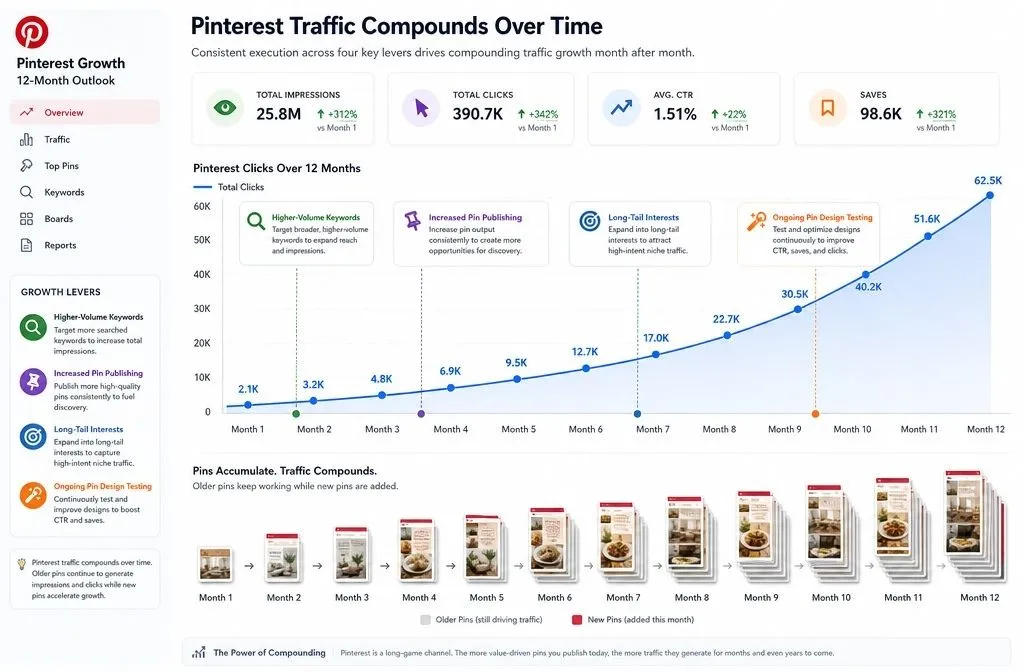
Once the five checkpoints above are in place, it helps to understand what “working” actually looks like on a realistic timeline, because Pinterest traffic compounds rather than arriving all at once. Ten pins a day at even a modest one click per pin works out to roughly 300 new visitors in month one. That sounds small on its own. But those same pins keep circulating through Pinterest’s network long after you’ve published them, and that early traffic can realistically grow into tens of thousands of monthly clicks by month twelve, without adding more posting volume.
Four levers speed that curve up. Target higher-volume keywords instead of guessing. Publish more pins per day, which round-ups and listicles make easy since every image in the post becomes its own pin. Target long-tail interests so Pinterest can place you in more home feeds. And test new pin designs on a rolling basis instead of settling on one look. None of these replace the diagnostic above. They just determine how fast your account climbs once the foundation underneath it is solid, which is the real answer to how to get Pinterest traffic that keeps growing instead of spiking once and fading.
A 30-Day Reset If Your Pinterest Traffic Has Stalled
If you’ve run through the diagnostic and have a rough idea what’s wrong, here’s how to sequence the fix instead of trying to change everything at once.
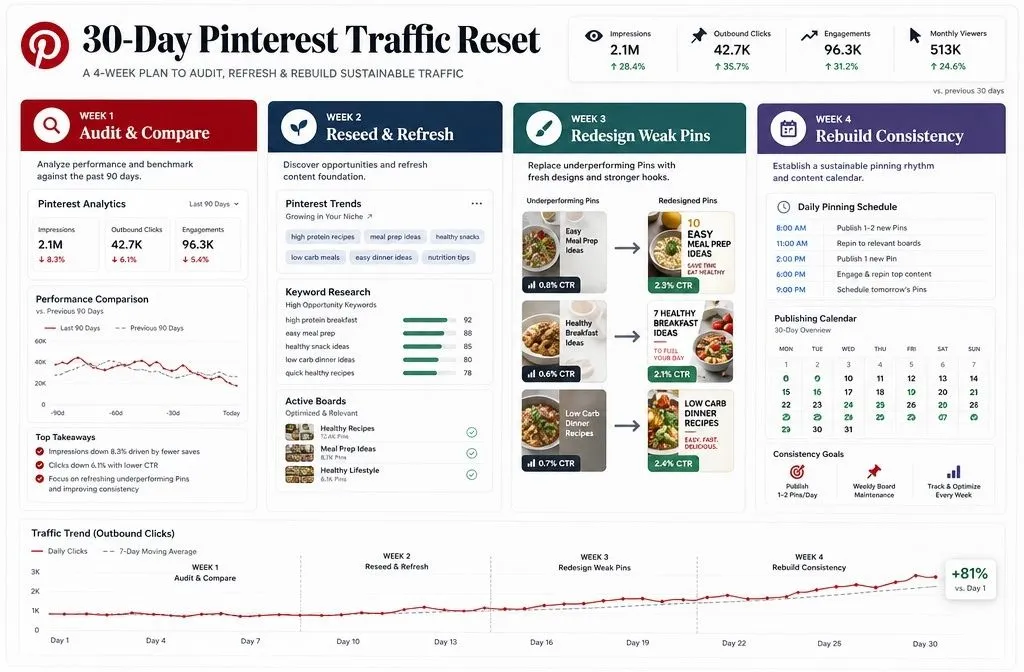
Week 1: Audit and compare. Pull your last 90 days of analytics against the prior 90 days. Write down your top 10 pins and boards by clicks, and note which keywords each one targets.
Week 2: Reseed and refresh. For any board that’s gone quiet, save 10 or more high-performing pins from other creators in that space before adding new content of your own. This reconnects the board to Pinterest’s interest graph. At the same time, recheck your top keywords in Pinterest Trends and swap out anything that’s clearly gone seasonal or stale.
Week 3: Redesign your weakest performers. Take three lowest-performing posts you still believe in and create a fresh pin for each: new image, new text overlay, same link. Leave the post copy alone for now so design is the only variable you’re testing.
Week 4: Rebuild consistency. Set a pinning schedule you can actually sustain, even if that’s just five pins a day, and hold it for the full week without gaps. Consistency is the variable most people abandon first when results feel slow, and it’s usually the one doing the most work behind the scenes.
When It’s Time to Bring in a Pinterest Strategist
Some Pinterest problems really are fixable in a weekend with the checklist above. Others take longer to untangle, especially once keyword research, board strategy, and pin design all need attention at the same time. If you’ve worked through the diagnostic and traffic still isn’t moving after a full month, that’s usually the point where a second set of eyes catches something you can’t see from the inside.
That’s the gap I help close through Pinterest management: keyword-researched pins, SEO-structured boards, and a pinning strategy built around what your account specifically needs instead of a generic template. If you’d rather talk it through first, book a free consultation with me, and we’ll figure out where your account is stuck.