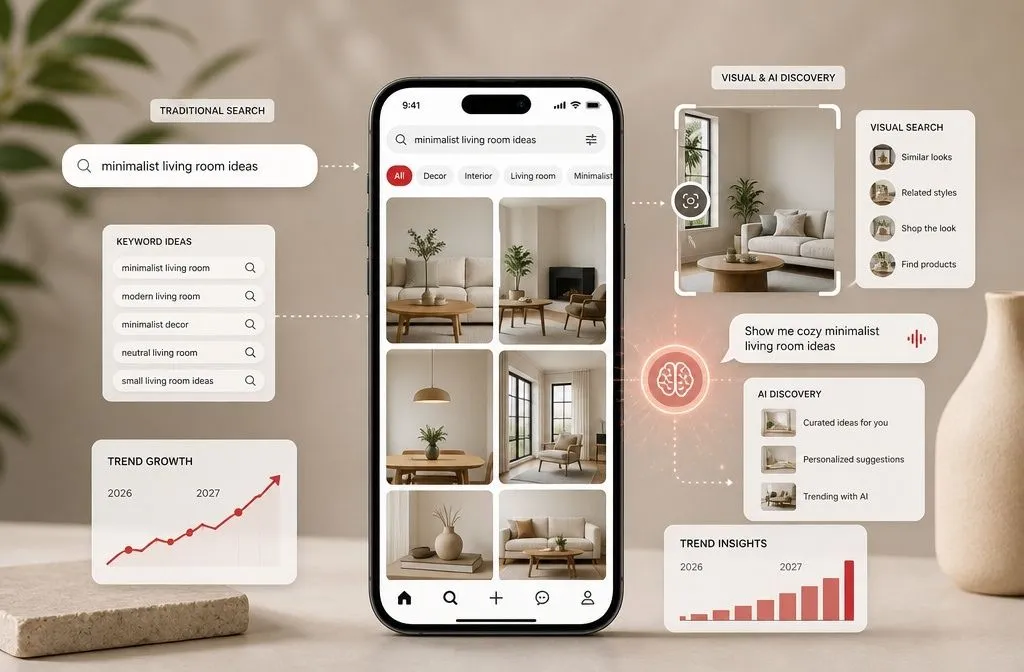
Pinterest SEO for Etsy shops means shaping your pins, boards, and profile around the words shoppers actually type into Pinterest, so your listings keep surfacing months after you hit publish. Etsy SEO gets you found inside the marketplace. Pinterest is a separate search engine entirely, and it is not small: Pinterest reported 640 million monthly active users in Q2 2026, its eleventh straight quarter of double-digit user growth.
One warning before you start. Most of the guides ranking for this topic tell you to open Pinterest settings, click Claim, and connect your Etsy shop. That option no longer exists, and Pinterest’s own documentation explains why. If your first hour goes into chasing a button that was removed, you will conclude Pinterest is broken when the setup simply changed.
Here is the version that matches what Pinterest and Etsy currently document.
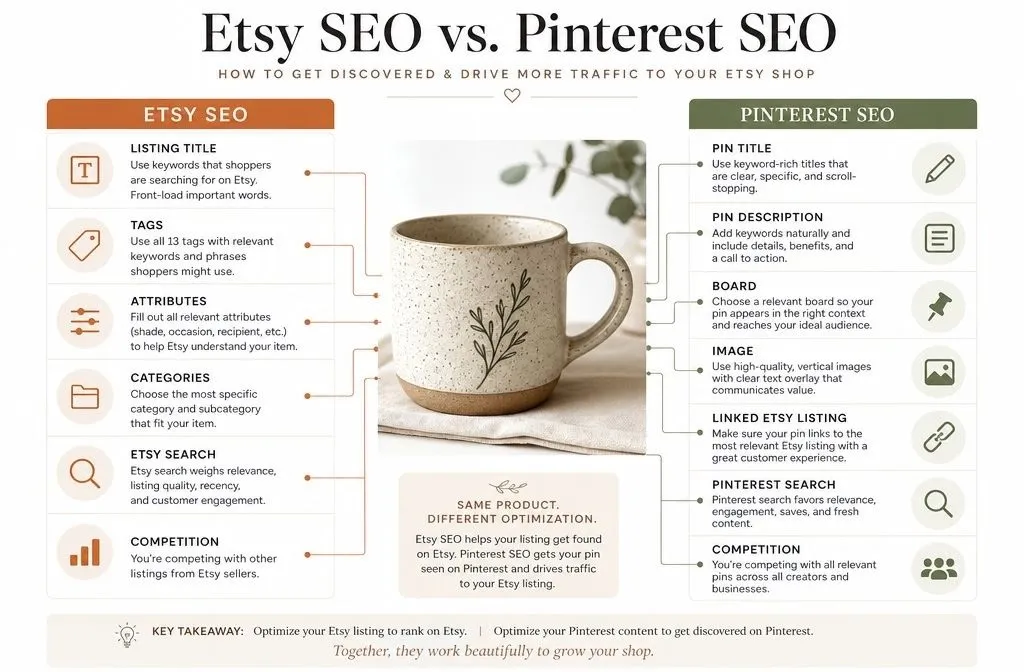
Pinterest SEO for Etsy shops is not Etsy SEO
Etsy search reads your listing title, tags, attributes, and category, then ranks you against other sellers who want the same buyer. Competition is direct, and the pool is other Etsy shops.
Pinterest reads something different. It reads your pin title, your pin description, the board you saved to, and the page your pin links to. Then it decides which feeds and search results your pin belongs in. Your competition is every pin on the topic, not just Etsy sellers.
The practical consequence: your Etsy tags are a starting point, not a keyword list. A tag like “boho wall hanging” may perform on Etsy while Pinterest users search “boho bedroom wall decor” because they are planning a room, not shopping a product. Different mindset, different words. Pinterest also rewards patience in a way Etsy does not. A listing that stops selling drops off Etsy search quickly. A pin that earns saves can keep sending clicks for a year or more.
What you can and cannot connect between Etsy and Pinterest
The claiming myth
Pinterest’s help documentation is direct about this. To claim a website, you must own the domain and be able to edit the source code, which means you cannot claim most online stores hosted on marketplaces like Etsy, eBay, and Amazon.Etsy shops used to be claimable through a separate integration. That integration was retired. Any guide telling you to visit Settings, then Claim, then Etsy is describing a screen that is no longer there.
What you lose by not claiming: attribution on pins others create from your listings, and domain-level analytics inside Pinterest. What you keep: everything that actually drives traffic. Search visibility, board authority, pin-level analytics and outbound clicks all work normally on an unclaimed Etsy link.
What you can still connect
Etsy’s Shop Manager has a social sharing tool that connects to Pinterest, and Etsy’s own seller handbook recommends using it. Connecting there is a publishing convenience, not domain ownership, and the two are frequently confused.
If you eventually want claimed-domain benefits, the route is a site you control: a Pattern site, a Shopify store, or a simple blog that links to your listings. Worth considering later, not a blocker now.
Find keywords the way Pinterest surfaces them
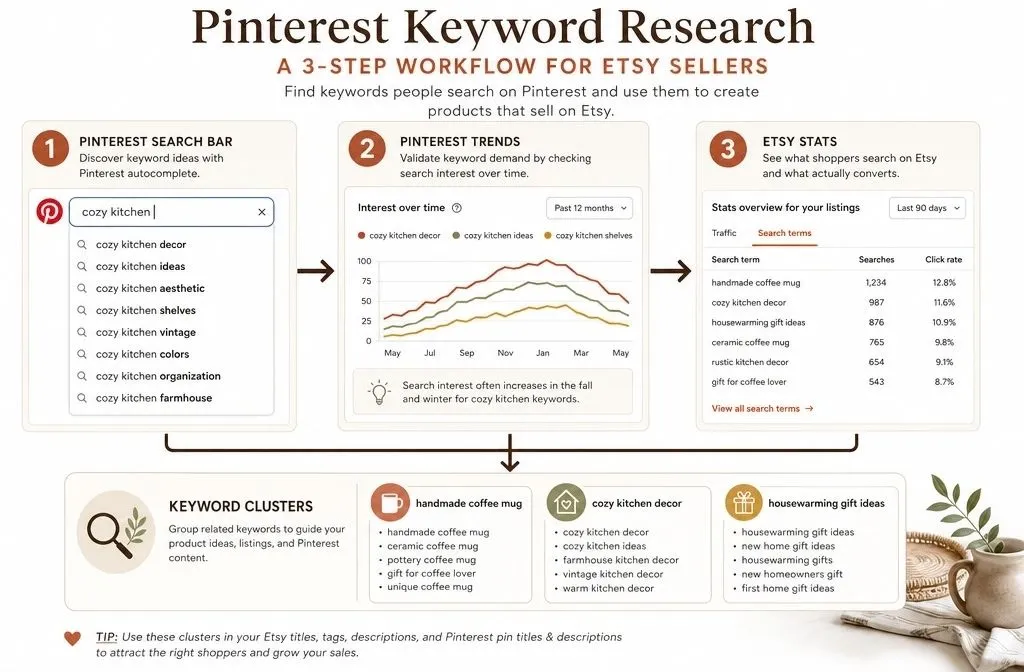
Three free sources cover most of what you need.
The Pinterest search bar. Type a product term and read the autocomplete list. Those are real queries, ordered roughly by demand. Type “personalized gift for” and Pinterest will finish the phrase for you in a dozen directions. Each completion is a candidate pin title and often a candidate board.
Pinterest Trends at trends.pinterest.com shows search interest over time by country and category. Its main value for Etsy sellers is timing. Pinterest shoppers plan early, so seasonal terms climb well before the season arrives. Check when your terms actually peak rather than guessing.
Your own listing data. Open Etsy Stats and find the search terms that already convert. Then run each one through the Pinterest search bar to see how Pinterest phrases the same idea. The overlap between the two is your highest-confidence keyword set.
Group what you find into small clusters rather than chasing single terms. A shop selling ceramic mugs might build clusters around “handmade coffee mug,” “cozy kitchen decor” and “housewarming gift ideas.” Each cluster becomes a board, and each product can be pinned into more than one of them with a different angle.
If keyword work is where you tend to stall, my [full keyword research process] walks through the same steps with screenshots.
Set up your profile and boards to reinforce one topic
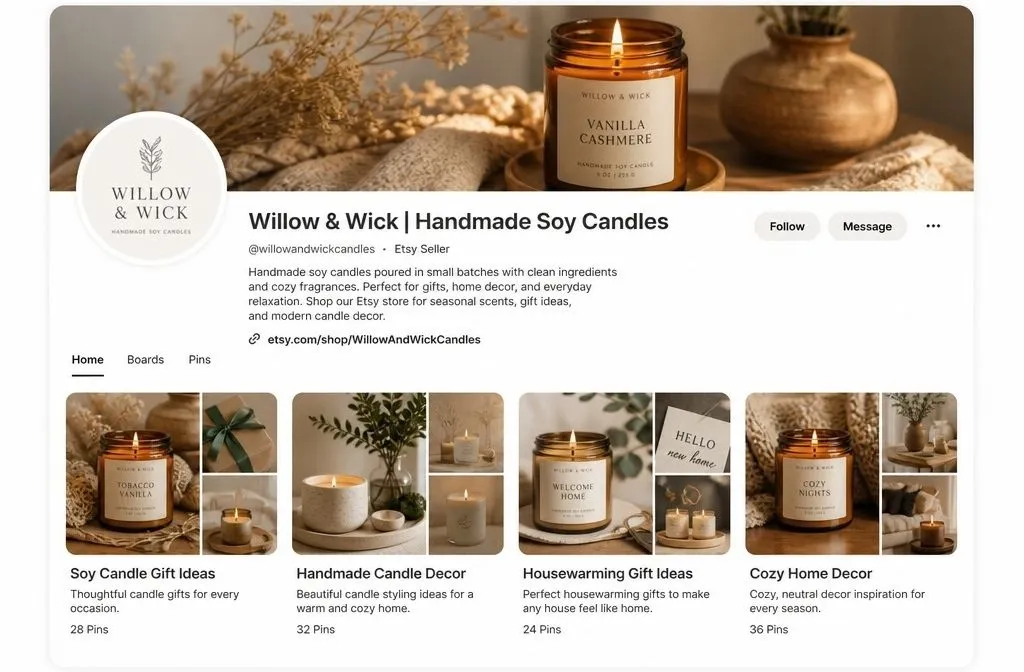
Your profile name field is indexed, so use it. “Willow & Wick” tells Pinterest nothing. “Willow & Wick | Handmade Soy Candles” gives it a category. Your bio should describe what you sell in plain words a shopper would use.
Board [board naming] follows the same rule. Keyword-first, adjective-free. “Cozy Home Vibes” is invisible. “Soy Candle Gift Ideas” is searchable. Skip near-duplicate boards, since “Candle Gifts” and “Gifts With Candles” compete with each other for the same relevance signal.
Write a real description for every board. Use synonyms and related phrases rather than repeating the board name, and include the words shoppers pair with your category: ideas, inspiration, gifts, decor.
Before you fill a new board with your own products, save eight to ten strong pins from other creators on the same topic. Pinterest builds its understanding of a board from what sits on it, and a board holding only your listings gives the algorithm a thin signal to work with.
Boards need a business account behind them for analytics and product features, so [set up a Pinterest business account] first if you have not already. Conversion from a personal account keeps your existing pins and followers.
Write pin text to Pinterest’s real limits
Competing articles repeat a 500 character description limit. Pinterest’s current pin specs say otherwise, and the difference matters.
| Field | Actual limit | What it does |
| Pin title | 100 characters | Displayed, and read for relevance |
| Text box on the image | 250 characters | Displayed |
| Description | Up to 800 characters | Used by the algorithm, not shown in feed or search |
Pinterest states plainly that descriptions do not appear when viewing a pin in the home feed or search feed, and that its algorithm uses them to determine relevance for delivery. Your description is a targeting field, not sales copy. Nobody browsing will read it.
That changes how you write it. The title has to earn the click on its own. The description is where the synonyms, the occasion words and the material details go.
A working example for a listing of hand-poured lavender candles:
- Title: Hand Poured Lavender Soy Candle for a Calm Bedroom
- Description: Small batch soy wax candle scented with real lavender essential oil, poured in a reusable amber jar. Works as a calming bedside candle, a bridesmaid gift or a housewarming present for someone building a slow, cozy home. Made to order and shipped in plastic free packaging.
Notice the description never repeats the title. Alt text is a third field again, and Pinterest’s guidance is to describe what a person can actually see in the image. Write it for a screen reader, not for keywords.
Pinterest’s own creative fundamentals reinforce the basics: add a title and description, include relevant keywords, and save the pin to a genuinely relevant board.
Design pins to Pinterest’s published specs
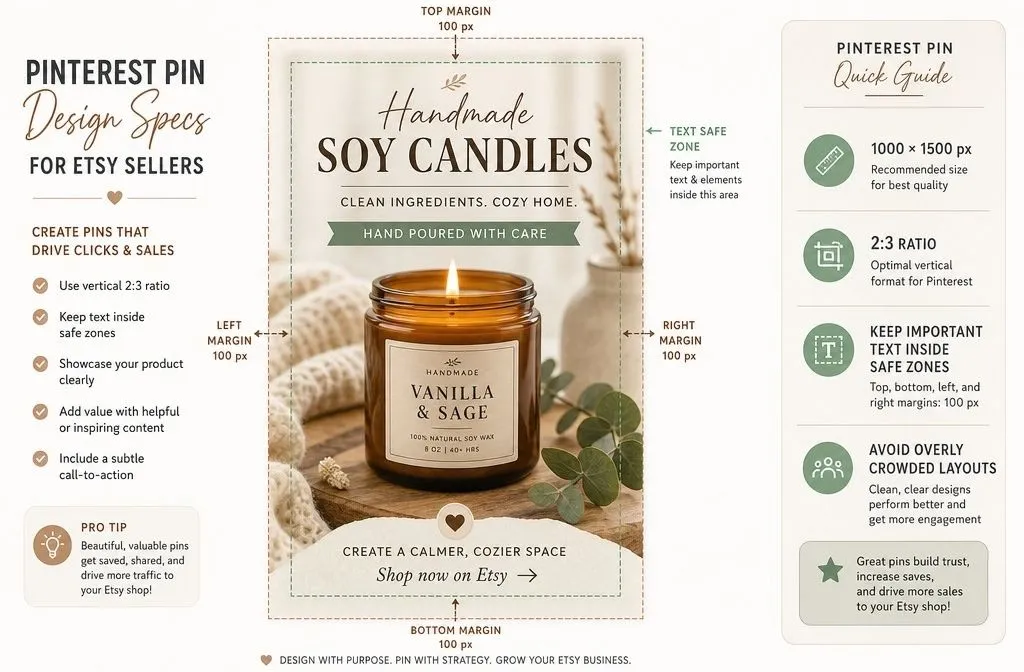
Pinterest recommends a 2:3 aspect ratio, or 1000 x 1500 pixels, and warns that pins exceeding a 2:4.2 width to height ratio get truncated in feeds. Etsy listing photos are square, so pinning them directly means you surrender roughly a third of your feed real estate to a competitor’s taller pin.
Pinterest also publishes safe zones for text placement: 270 pixels from the top, 65 from the left, 195 from the right and 790 from the bottom. Anything outside those margins risks being covered by interface elements on some devices. The bottom margin is the one most sellers get wrong, since Pinterest overlays quite a lot of chrome down there.
Two more specifics worth knowing. Accepted file types are BMP, JPEG, PNG, TIFF and WEBP, with a 20 MB maximum on web. And Pinterest automatically applies a faint tint over image pins with white or near-white backgrounds, which is worth accounting for if your product photography is shot on white.
Build three to five templates in Canva at 1000 x 1500 and swap the photo and text each time. Vary the layouts. Accounts where every pin looks identical tend to flatten out, partly because the feed stops feeling like new content.
Rebuilding photography for a hundred listings is where most Etsy sellers give up on Pinterest. If that is the wall you have hit, [Pinterest management services] exist for exactly this reason, and it is usually cheaper than the months of testing it takes to work out what your niche responds to.
Where each pin should link, and the 4% most sellers miss
Link every pin to a specific listing, not your shop homepage. A shopper who clicks a pin of one candle and lands on a grid of forty products usually leaves.
Now the part almost no Pinterest guide mentions. Etsy runs an opt-in program called Share & Save. Once enrolled, if a buyer clicks a trackable link you shared and places an eligible order within 30 days, Etsy refunds 4% of the order total directly to your payment account. You opt in from Shop Manager under Marketing, then Share & Save.
Your Pinterest traffic already qualifies as the kind of external traffic the program is built for. If you are pinning without enrolling, you are paying full fees on sales you generated yourself.
Two conditions to know. Eligible links must use the yourshopname.etsy.com format, so a custom shop URL needs domain forwarding to qualify. And if the buyer’s last click before reaching your shop was an Offsite Ad, that order is excluded from Share & Save and the Offsite Ads fee applies instead.
One caution on retrofitting. Sellers who mass-edited existing pins to swap in Share & Save links have reported tripping Pinterest’s spam filters. Apply the links to new pins going forward and edit older ones in small batches.
Rich pins on Etsy links behave differently
[Rich pins] pull structured data from the linked page. Product rich pins can show live pricing and availability on the pin itself.
Etsy listing pages carry product markup, so pins pointing at them often display product data automatically. What you should not expect is control over it. Pinterest only shows product rich pin information when the merchant guidelines are met and the item is in stock, and on a marketplace listing you do not own the page or its markup.
The old setup route is also gone. The rich pin validator at developers.pinterest.com is retired, and Pinterest’s current documentation describes rich pins as something that populates from page markup rather than something you apply for. Treat rich pin behavior on Etsy links as an outcome you observe, not a setting you configure. If it appears, good. If it does not, your pin still ranks on its own text and image.
How often to pin
Pinterest does not publish a required daily number. The “48 pins a day” and “pin 25 times minimum” figures circulating online are practitioner heuristics, not platform guidance, and treating them as rules leads people to recycle the same three images until the account looks spammy.
What Pinterest does emphasize is fresh content: new images it has not indexed before, saved to relevant boards, on a consistent schedule. A realistic Etsy shop cadence:
- Months 1 to 2: three to five new pins per week, mostly bestsellers, spread across boards
- Months 3 to 6: one to two new pins daily once you have templates and a batch workflow
- Ongoing: add fresh designs to listings that are already earning clicks, and start seasonal pins 30 to 45 days before the season
Do not pin the same listing to the same board twice in a week, and space multi-board pinning of one product across several days.
Measuring what Pinterest SEO for Etsy shops is doing
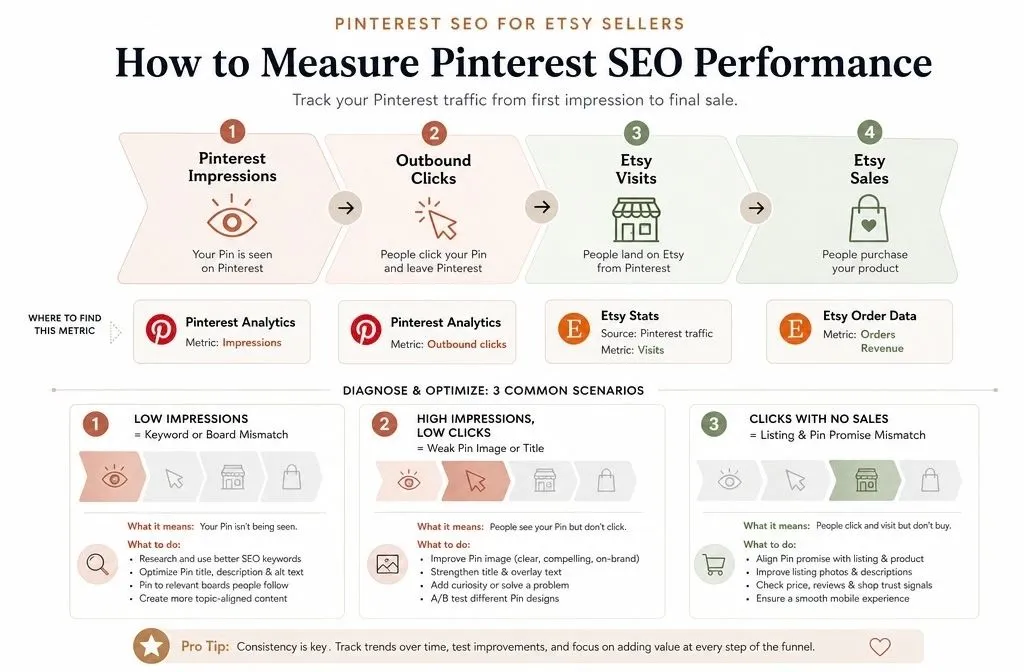
Pinterest Analytics gives you impressions, saves and outbound clicks per pin. Outbound clicks are the number that matters. Impressions without clicks means your image or title is not earning the visit.
Etsy Stats gives you the other half. Filter traffic by source to see Pinterest sessions, then compare against your Share & Save refunds to see which pins produce orders rather than browsers.
Reading the two together tells you what to fix:
| What you see | Likely cause | What to change |
| Low impressions | Keyword or board mismatch | Rewrite titles and descriptions, reseed the board |
| High impressions, low clicks | Weak image or title | New design, sharper title, better crop |
| Clicks but no sales | Listing does not match the pin promise | Align listing photos and copy with the pin |
Give any change 30 to 45 days before you judge it. Pinterest distribution builds slowly, and a pin’s first week tells you almost nothing.