Most coaching accounts on Pinterest do not fail at keywords. The pins get impressions. The profile looks polished. Nobody books anything.
Pinterest SEO for coaches usually breaks at the destination. You send traffic to a sales page, and Pinterest reads that page to work out what the pin is about. A sales page says “book a discovery call.” It does not say “how to stop overworking as a newly promoted manager.” So the pin has nothing to rank for, and the browser who did click was never going to buy on a first visit.
Fix the destination first. Then fix the keywords. The pin design matters least of the three, which is the opposite of how most people spend their time.
Why Pinterest SEO for coaches works differently than it does for bloggers
Almost every Pinterest guide you have read was written for bloggers, and bloggers have an advantage you do not: inventory. A food blogger has 300 posts to pin. You have six, and two of them are about your own launch.
This gap changes the strategy. You cannot brute-force reach with pin volume, so you have to earn it with keyword precision and by getting more pins out of fewer pages.
Otherwise, the platform is a good fit. Pinterest’s own audience data puts 96% of top searches as unbranded, and its marketing insights pages cite 97%. Either way, nobody is searching your name. They search the problem, which means an unknown coach and an established one start from roughly the same place.
Two more numbers worth knowing before you commit. Pinterest’s global audience is about 70% women and 30% men. And Gen Z is now over half the user base and the fastest-growing cohort. If you coach men over 50 on executive strategy, Pinterest is a harder channel than the guides admit. If you coach women on career, money, wellness, business, or parenting, the audience is already there.
Your pin destination is the whole ballgame
Pinterest crawls the page behind every pin and uses that page to understand and rank the pin. Point a pin at a page with 40 words of copy and three testimonials, and you have handed Pinterest almost nothing to work with.
Worse, you have handed the visitor a decision they are not ready to make. Someone who just discovered you eight seconds ago is not booking a call.
Pin to pages that do three jobs at once:
- Blog posts that answer the search. Real copy, the keyword in the H1 and body, 800 words minimum. Pinterest gets something to index, and the reader gets something to save.
- Freebie landing pages with actual content on them. Not a bare email gate. Write 300 words explaining the problem the freebie solves, then the opt-in.
- Resource or guide pages that link onward to your service page.
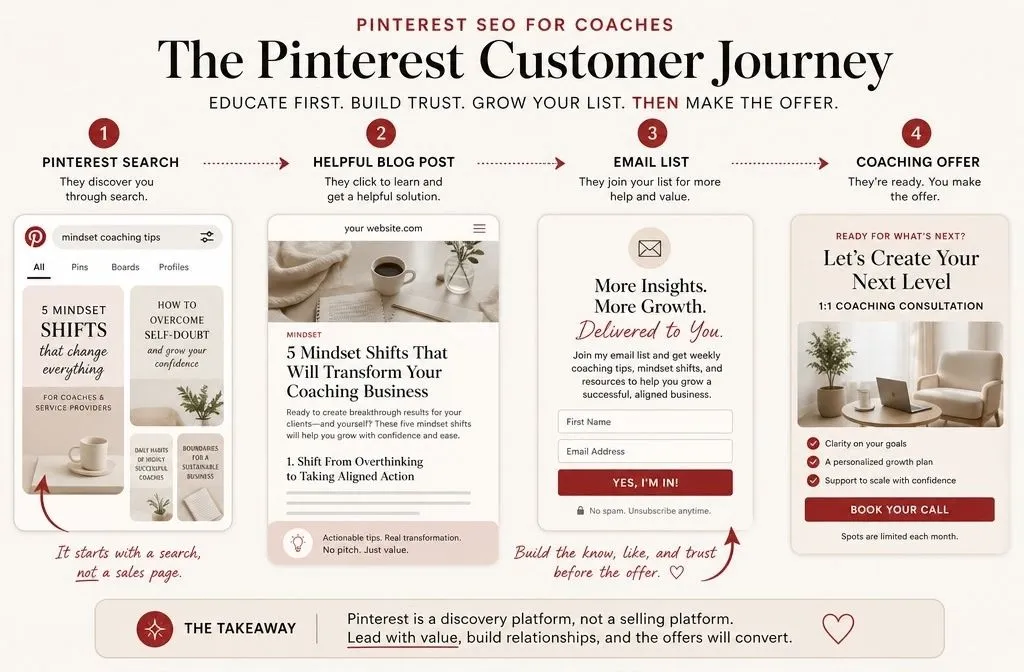
Your sales page is still the goal. Just make it the third click, not the first. The path that works is pin, then blog post, then email list, then offer. Every coach who tells me Pinterest “does not convert” is skipping the middle two steps.
If your existing posts are thin or your pages load slowly, sort that before you make a single pin. My Pinterest SEO checklist for pages you’re pinning to covers what Pinterest looks for.
Getting this structure right is most of what I do for clients. If you would rather not build the content layer yourself, we can get on a call, and I can help you with your strategy.
Pinterest SEO for coaches starts with the problem, not the job title
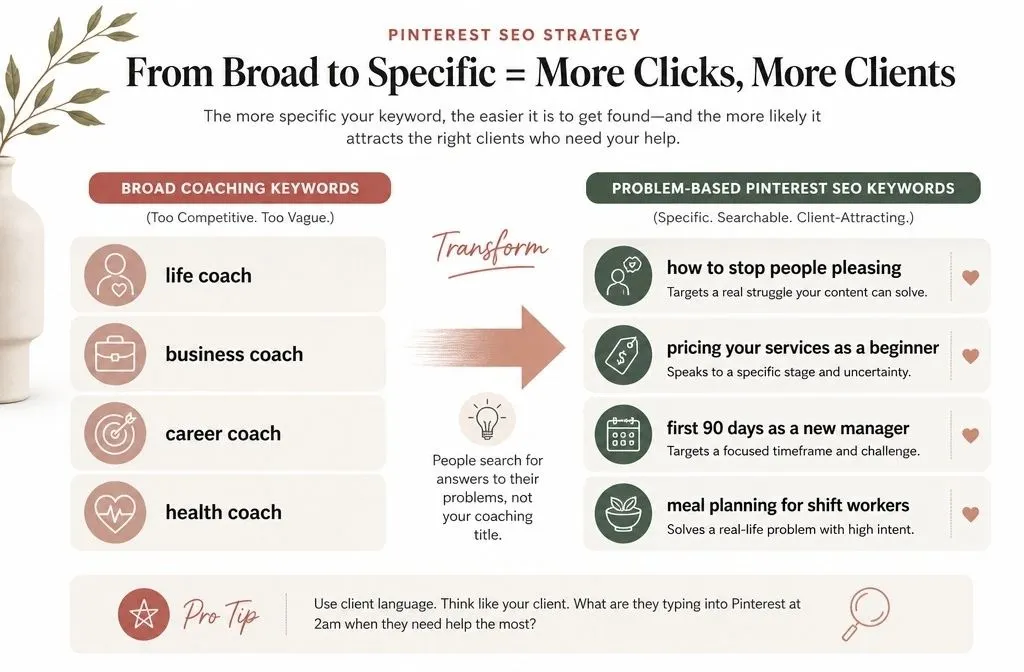
Here is the single most common keyword mistake in this niche: coaches target “life coach,” “business coach,” or “mindset coach.”
Almost nobody searching those terms is a potential client. They are other coaches, students, and people researching the profession. Your real client does not know they need a coach. They know they cannot stop saying yes to things, or they dread Sunday nights, or their team stopped talking to them after the promotion.
So target the symptom, not the solution category:
| Do not target | Target instead |
| life coach | how to stop people-pleasing |
| business coach for women | pricing your services as a beginner |
| career coach | first 90 days as a new manager |
| health coach | meal planning for shift workers |
The second column is where the search volume and the buying intent both live.
Where to find the keywords
Four free sources, in the order I use them:
- Pinterest search bar autocomplete. Type a problem phrase and stop. The suggestions are real queries with real volume behind them.
- The guided search tiles that appear under your results after you hit enter. Those are Pinterest telling you the modifiers people add.
- trends.pinterest.com. Filter by country and age range. Check whether your topic has a season, because coaching topics often do. New Year, September, and January hit hard for career and habit content.
- Competitor pins. Search your problem keyword, open the top pins, and read the titles and descriptions. Pinterest surfaced those for a reason.
Those four will get you a usable keyword list. They will not tell you which of your keywords is worth prioritising, which is where I reach for a paid tool.
PinClicks is the one I use. It runs on a subscription with a free trial, and it does three things the free sources cannot. Keyword Explorer gives you relative volume, so you can sort a list of forty candidate phrases instead of guessing. Top Pins shows you which pins are winning a keyword and how many saves they pulled, so you can see whether a term is already locked up by established accounts. Account Explorer surfaces the keywords a competitor ranks for that you have not covered yet, which for a coach with a thin content library is the fastest way to find your next five posts.
For a coaching account specifically, the volume data matters more than it does for a blogger. A blogger can publish twenty posts and let the data sort itself out. You are publishing six, so each one has to be the right call the first time.
Worth being clear about the limits: PinClicks estimates volume; it does not receive it from Pinterest. Treat the numbers as relative rankings rather thanexact search counts, the same way you would treat any third-party keyword tool.
The full process is in my Pinterest keyword research walkthrough.
Build a cluster, not a list
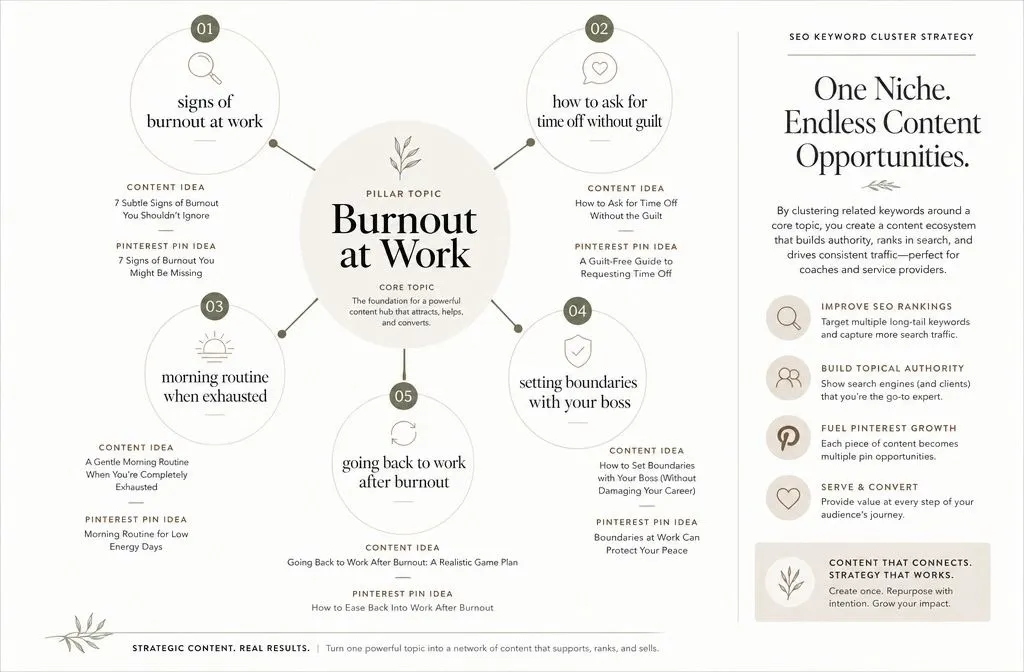
Do not chase one keyword per post. Pick one core problem and build five to eight related long-tail keywords around it, then create a page for each.
A cluster for a burnout coach might run: signs of burnout at work, how to ask for time off without guilt, morning routine when you are exhausted, setting boundaries with your boss, going back to work after burnout.
Pinterest shows users more of what they already engaged with, so a reader who saves one pin from the cluster gets served the others. Five posts working together outperform five unrelated posts by a wide margin. More on the mechanics in my post on Pinterest keyword clusters.
Set your account up so Pinterest can read it
None of the above works if Pinterest cannot connect your pins to your site.
Convert to a business account. Free, and it unlocks analytics plus the ability to claim your domain.
Claim your website. Claiming ties every pin from your domain back to your profile and gives you site-level data. Use the DNS TXT record method if you can, because it survives theme and plugin changes. Pinterest’s claim your website guide walks through each option.
Enable Rich Pins. They pull your page title and meta description onto the pin automatically, which is one more keyword-relevant signal you do not have to write twice. Check my guide on what are rich pins and why they matter.
Write a display name that includes your niche. Not “John Doe.” Use “John Doe | Career Coach for New Managers.” Pinterest indexes that field, and it is the first thing a person reads.
Name your boards in plain search language. “Career Change Tips” beats “Level Up, Bestie.” Save the personality for the board description, where you can add synonyms and related terms. I collected examples in my post on Pinterest board names.
Write pin titles and descriptions Pinterest can easily index
Design gets all the attention here and deserves less of it. The copy fields do the ranking.
Start with the format. Pinterest recommends a 2:3 aspect ratio, or 1000 x 1500 pixels, and notes that larger ratios may get cut off in people’s feeds.
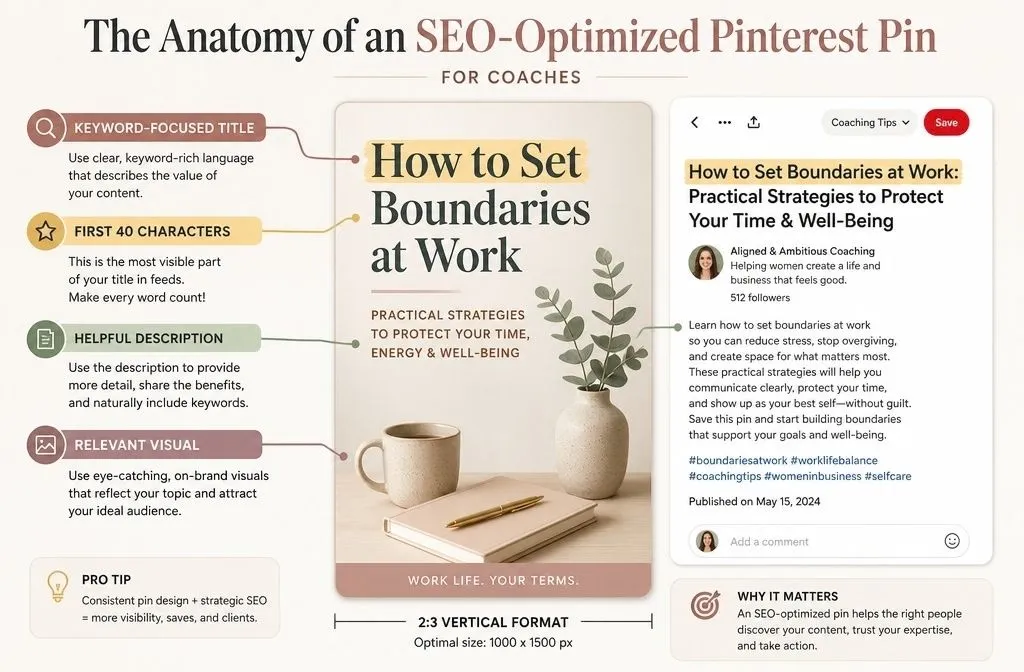
Front-load your keyword in the first 40 characters
This part is where most skip. Pinterest allows up to 100 characters in a pin title, and states that the first 40 are the ones most likely to be shown to people on the platform.
Forty characters is short. “The Ultimate Guide to Setting Boundaries at Work for Ambitious Women” gets truncated to “The Ultimate Guide to Setting Boundarie” and wastes the visible half on nothing.
Rewrite it as “Setting Boundaries at Work: 7 Scripts That Actually Work for Ambitious Women.” The keyword and the payoff both land inside the visible window, and the rest still gets indexed. My pin title formula post has more patterns.
Use the description for the terms that did not fit
Pin descriptions allow up to 500 characters. You do not need all of them, but three to five sentences beat one.
Write it for a human first. Open with the pain, name the outcome, then work in two to four synonyms and related phrases from your keyword research. Close with a reason to click, not a command to click. “The third script is the one that finally worked for me” outperforms “click to learn more.”
Hashtags are optional. Pinterest’s current creative documentation covers titles, descriptions, and specs, and says nothing about hashtags, which tells you where they sit in the priority order.
Course creator Pinterest SEO: evergreen beats launch
Course creators tend to arrive on Pinterest four weeks before a launch and leave three weeks after it, having concluded the platform does not work.
Pinterest is slow. Practitioner consensus, and my own experience with client accounts, puts meaningful traffic at three to six months for a new account. Pinterest has not published an official timeline, so treat that as a working estimate rather than a rule. Either way, a pin published in launch week is compounding for a cart that closed months ago.
Pin the topic, not the cart:
- Turn each module into a blog post. A six-module course becomes a six-post cluster, permanently pinnable, all pointing toward the same offer.
- Make the waitlist the conversion event. Waitlists are open year-round. Carts are not.
- Give your free webinar an evergreen version. Pins pointing at a dated registration page are dead the day the date passes.
- Answer the objection, not just the topic. “Is a course worth it if you already know the basics” catches people at the exact moment they are deciding.
Run this properly, and your next launch opens to a list Pinterest built for you over six months, instead of a list you scrambled for in three weeks.
What to measure, and how to read it
Three metrics matter, and they diagnose different problems.
Impressions tell you whether Pinterest understands your pin. Low impressions mean your keyword or your board topic is off, not that your design is ugly.
Outbound clicks tell you whether the title and image earned the click. Deep impressions with low clicks are a copy problem. Rewrite the first 40 characters before you touch the design.
Saves are the strongest positive signal you can get, because a save is a user telling Pinterest the content was worth keeping.
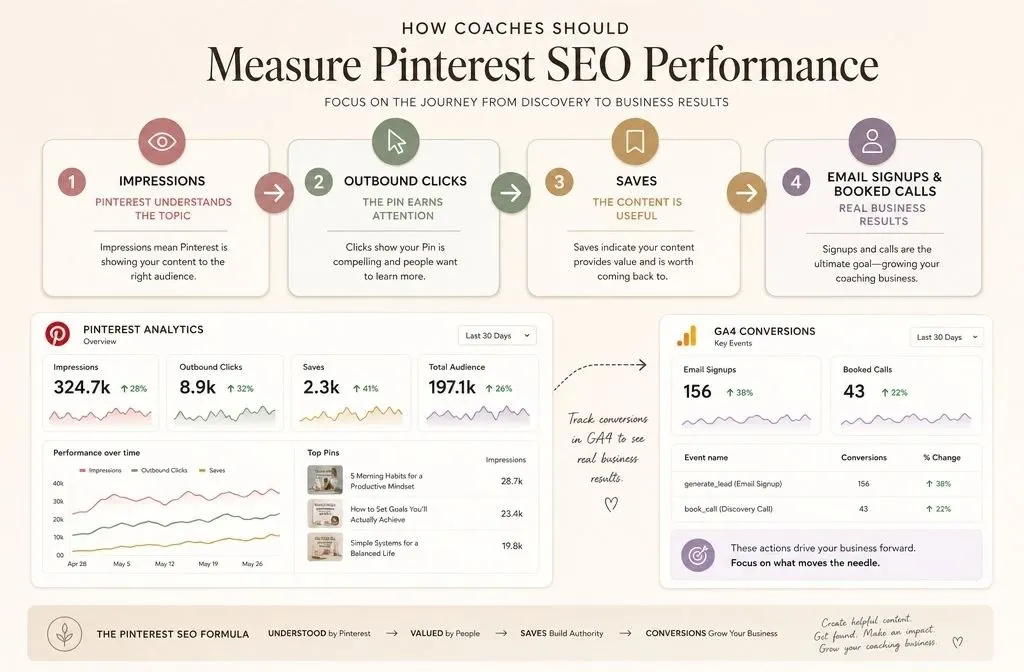
Then check the part Pinterest cannot show you. Open GA4, segment traffic by Pinterest as a source, and look at email signups and booked calls from that segment. Plenty of accounts look weak in Pinterest Analytics while quietly producing the best-converting traffic on the site. Plenty of others look great and produce nothing. You will not know which one you have until you look at your own analytics.
Give it two full quarters before you judge the channel. Pinterest SEO for coaches is slow, and then it is not, and most people quit in the flat part.