

Most people optimize a pin, publish it, and never check the analytics whether it ranks. That laziness is why so many accounts plateau without knowing why. If you want to track Pinterest keyword rankings over time, you need a repeatable way to see where your pins land in search and whether that position moves.
This guide covers what to look for in your analytics if your Pinterest efforts are working, the free and paid tools that I use, and a monthly workflow you can run in under an hour.
What “ranking” means on Pinterest
Pinterest does not sort search results by date. It uses a proprietary ranking system, often called the Smart Feed, that orders pins by relevance and estimated quality for each query. The main inputs are keyword relevance in your titles, descriptions, and board names, plus engagement signals like saves and outbound clicks, and content freshness.
That matters for tracking. A pin’s position is not fixed, and it is not identical for every user. Personalization means the exact spot you see when logged in is not what a stranger sees. So the goal of Pinterest rank tracking is not a single perfect number. It is a consistent measurement you can repeat and compare month to month.
Trends data is not the same as rank data
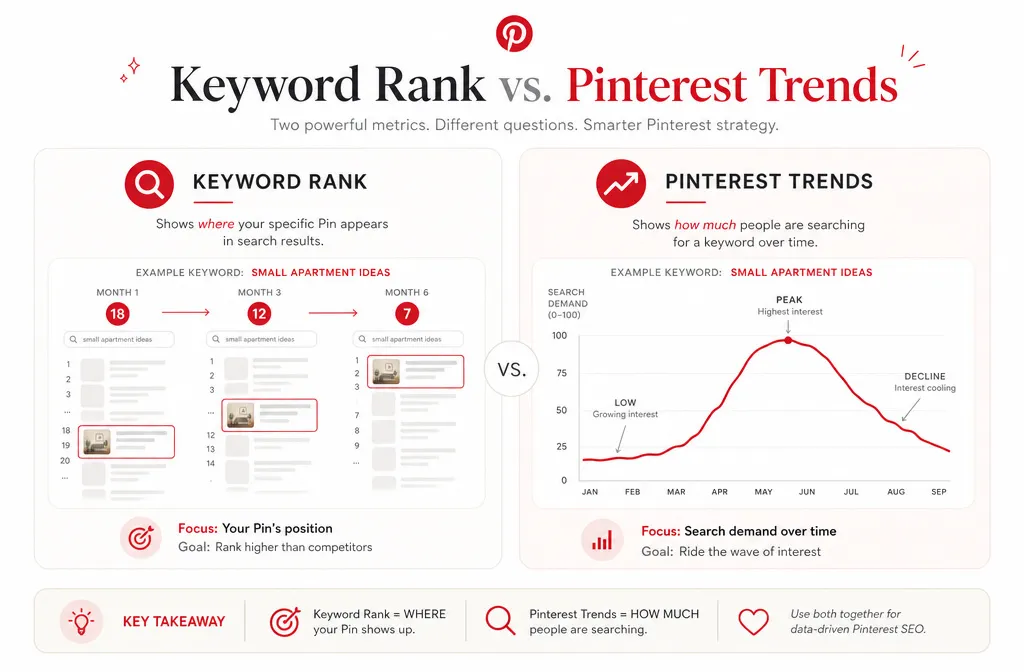
A common mistake is treating the Pinterest Trends tool as a rank tracker. It is not one. Trends shows how search popularity for a keyword rises and falls over time, indexed on a 0 to 100 scale where the peak is set to 100. It tells you demand and seasonality, not where your specific pin sits.
Trends is still worth checking, because a keyword dropping in ranking might just be losing seasonal demand rather than losing relevance. One note: Pinterest only serves Trends data to profiles set to the US, UK, or Canada, so set your profile location accordingly if the graph does not load.
The manual method: free, slow, and honest
You can track pin position without paying for anything. This is the method to start with if you manage one account.
Open a fresh browser session where you are not logged in, so results are less personalized. Search your target keyword. Scroll until you find your pin, and note its rough position. Log the keyword, the pin URL, the position, and the date in a spreadsheet. Repeat monthly for the same keywords.
A few honest caveats. Pinterest limits browsing for unauthenticated users and may redirect you to a login screen after a couple of actions, so this is fiddly at scale. Position also shifts by device and location. The value here is not precision. It is a rough, repeatable read on direction: climbing, flat, or falling. That is usually enough to decide what to rework.
Set up your spreadsheet with these columns: keyword, pin URL, board, position this month, position last month, and notes. The month-over-month comparison is the whole point.
Using Pinterest Analytics as a proxy
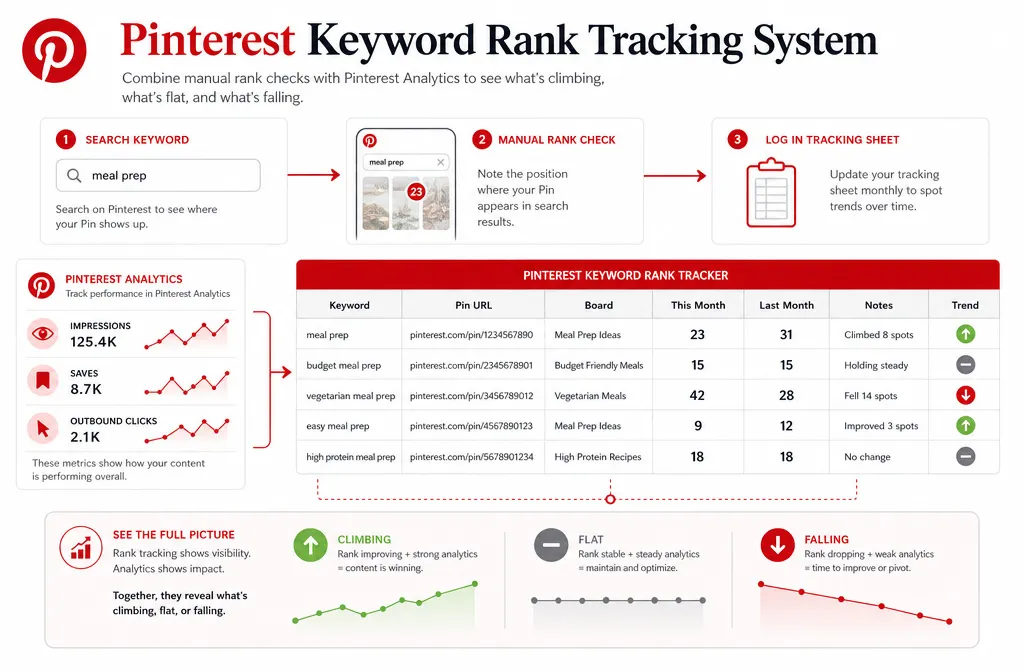
Pinterest Analytics does not report keyword position directly, but it gives you the signals that ranking produces. For each pin, you can track impressions, saves, outbound clicks, and pin clicks over time.
Rising impressions on a pin usually mean it is surfacing for more searches, which is a proxy for improving rank. Impressions that climb while clicks stay flat point to a different problem: your pin is being shown but the title or image is not compelling enough to earn the click. That distinction tells you whether to fix targeting or fix creative, and you can only see it if you record the numbers monthly rather than glancing at them once.
Analytics is the layer everyone already has access to, so build your tracking habit here first before paying for a dedicated tool.
Dedicated Pinterest rank trackers
If you manage multiple accounts or clients, manual checking does not scale and a purpose-built pinterest keyword rank tracker saves hours.
Rankingso runs scheduled or on-demand checks and reports pin positions for the keywords you add to a project, with a dashboard for monitoring changes over time. PinClicks offers keyword rank tracking tied to your account, letting you save target keywords and watch their positions, and its companion Chrome extension surfaces pin, board, and URL performance as you scroll Pinterest. Both pull data more consistently than manual searching because they are not fighting the logged-out browsing limits by hand.
Treat any third-party tool’s number as a directional benchmark, not gospel. None of these tools has official access to Pinterest’s ranking system, so their positions are estimates. Their real strength is consistency: the same method applied on a schedule, which is exactly what tracking over time requires.
Track keyword variations, not one exact phrase
Do not put all your tracking on a single head keyword. Pinterest struggles to rank several of your own pins for the identical exact phrase, because it cannot decide which one deserves the slot, so spreading one keyword across many near-identical pins dilutes your reach.
Track the variation cluster instead. If your core term is “meal prep,” monitor “meal prep for beginners,” “budget meal prep,” and “vegetarian meal prep” as separate rows. This shows you which specific angle is winning, and that is far more actionable than watching one broad term bounce around.
A simple monthly tracking workflow
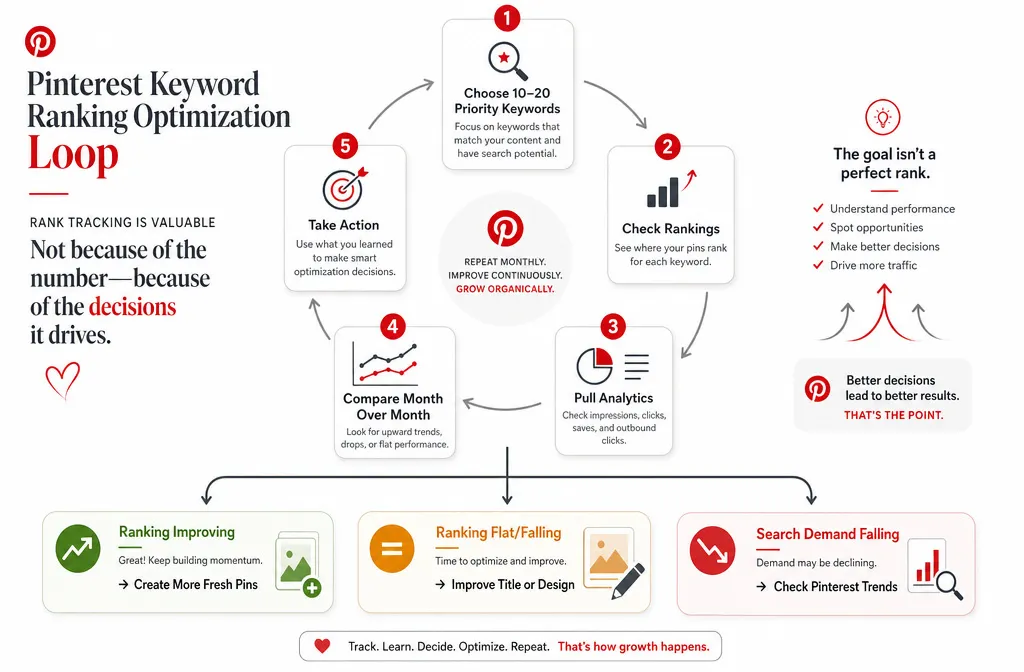
Rank tracking only works if it is routine. Here is a workflow you can repeat on the same day each month.
Pick your 10 to 20 priority keywords, the ones tied to your best content and money pages. Record each pin’s position using the manual method or your chosen tool. Pull impressions, saves, and outbound clicks from Pinterest Analytics for those same pins. Compare against last month’s row. Then act: for pins climbing, add fresh pins on the same topic to press the advantage; for pins falling or flat, rewrite the title, redesign the image, or check whether the keyword’s own search demand dropped in Trends before assuming your pin is the problem.
The whole point of tracking is the decision at the end. Numbers you never act on are just noise.